Virtual Staging Before and After: What Real Estate Agents Need to Know
By Noah James
• 7 min read • Founder, DrivewAI
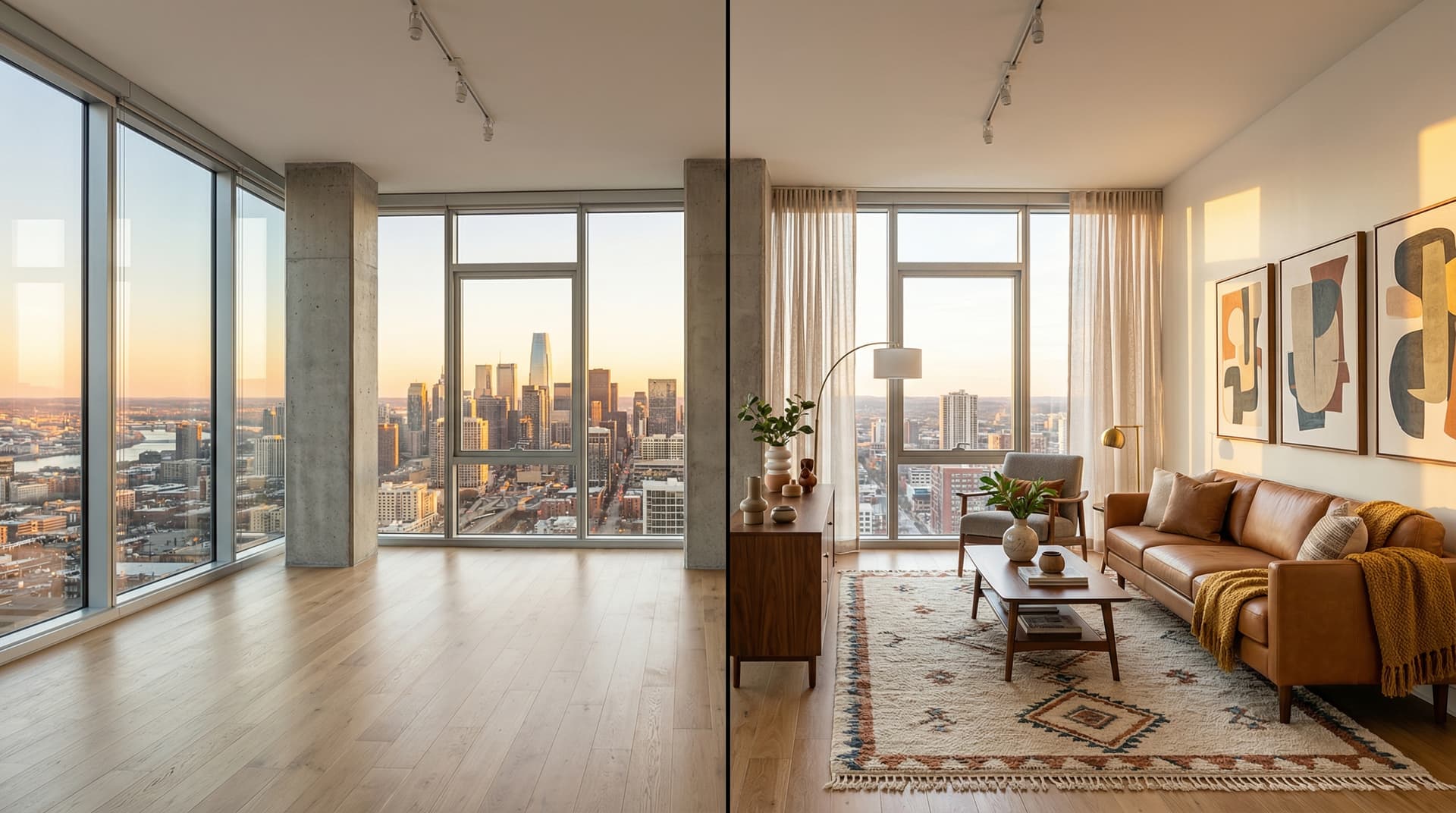
The most common question agents ask about virtual staging isn't about cost or quality — it's "can I see a before and after?" They want proof that the output looks real enough to put on the MLS without embarrassing themselves.
Fair question. The virtual staging market has matured rapidly since 2024, and the gap between AI-generated staging and human-designed staging has narrowed to the point where most buyers can't tell the difference in a listing photo. But "before and after" isn't just about visual quality — it's about understanding what virtual staging actually changes, what it preserves, and how to use the results without crossing disclosure lines.
What Virtual Staging Changes (and What It Doesn't)
Virtual staging adds movable items to an empty room. That's the core principle, and it's the line that separates ethical staging from misleading photo manipulation.
What AI staging adds: - Furniture — sofas, beds, dining tables, chairs, coffee tables, bookshelves - Soft furnishings — rugs, throw pillows, curtains, blankets - Decor — art on walls, table lamps, plants, books, vases - Lighting effects — warmer tones, filled shadows from the added lamps
What AI staging preserves exactly as-is: - Wall color and texture - Flooring material and condition - Windows, doors, and trim - Built-in features — fireplaces, shelving, kitchen cabinets - Ceiling height and room proportions - Natural light direction and quality
What virtual staging should never change: - Room dimensions or proportions - Wall colors (changing wall color is renovation marketing, not staging) - Flooring condition (hiding damage is misrepresentation) - View through windows - Structural elements
This distinction matters for MLS compliance. Staging adds items a buyer would expect to be removed before move-in. It doesn't alter the property itself.
How AI Staging Creates Before and After Results
Modern AI staging tools like DrivewAI use a two-stage process that produces cleaner results than the single-pass tools that gave AI staging a bad reputation in 2024:
Stage 1 — Room analysis. The AI identifies every architectural element in your photo — walls, windows, flooring, built-ins, ceiling lines, light sources. These are locked as immovable constraints.
Stage 2 — Furniture generation. Based on your chosen style, the AI generates furniture and decor that matches the room's exact perspective, scale, and lighting conditions. Shadows fall correctly. Furniture proportions match the room size. Reflections on hardwood floors are consistent with the light source.
The result is a before-and-after pair where the "after" looks like someone actually moved furniture into the room — because the AI is respecting the same physics a real interior designer would.
6 Staging Styles That Produce the Best Before and After Results
Not every staging style works equally well for listing photos. Here's what we've seen perform best across thousands of before-and-after generations on DrivewAI's staging platform:
Warm Contemporary — Our most-selected style, and it's not close. Cream and taupe palette with plush textures and rounded furniture. It photographs well under any lighting condition and appeals to the widest buyer demographic. If you're only staging one style, this is the safe pick.
Transitional — Classic silhouettes with clean lines. The blend of traditional and contemporary reads as "upscale but approachable" — ideal for suburban family homes in the $400K–$800K range.
Scandinavian — Light wood, white and gray palette, cozy textiles. The bright aesthetic makes rooms look 10–15% larger in photos, which is why it's the go-to for condos and smaller homes.
Coastal — White, soft blue, and natural rattan. Don't limit this to beach properties — Coastal staging adds an aspirational quality that tests well even in landlocked markets.
Mid-Century Modern — Tapered legs, warm walnut tones, bold accent colors. Strong performer with design-conscious buyers in urban markets. The furniture shapes are distinctive enough to make the staging feel intentional rather than generic.
Modern Farmhouse — Slipcovered sofas, reclaimed wood, black metal fixtures. Consistently strong in suburban and rural markets, especially in the South and Midwest.
MLS Disclosure Rules for Virtual Staging
Every MLS has slightly different rules, but the standard across the industry is clear: disclose that photos have been virtually staged. Common approaches:
- Add "Virtually Staged" text in the listing remarks - Include a disclaimer like: "Photos have been virtually staged to illustrate the home's potential. Home is sold unfurnished." - Some MLS systems require a "Virtually Staged" watermark or tag on the images
The National Association of Realtors Code of Ethics requires that listing photos present a true picture of the property. Virtual staging is compliant as long as it's disclosed and doesn't alter the property's actual condition.
Non-disclosure risks: MLS fines, broker complaints, and buyer trust issues that can tank a deal after showing. Always disclose. Buyers are accustomed to virtual staging now — it's expected, not deceptive.
Tips for Better Before and After Results
Declutter before shooting the "before" photo. If the room isn't fully vacant, remove personal items, cleaning supplies, and random objects. AI staging works best on clean, empty rooms — it's not designed to work around your seller's moving boxes.
Shoot wide and level. Use the widest angle your phone offers, hold the camera at chest height, and keep it level. Tilted or distorted photos produce tilted-looking furniture in the staging output.
Light the room. Turn on every light. Open every blind. The AI uses the lighting in your photo to determine where shadows and highlights fall on the staged furniture. Dark corners produce dark, hard-to-read staging.
Try 2–3 styles per room. DrivewAI renders each style in under 60 seconds. Show your seller two or three options and let them pick — it builds buy-in for the listing strategy and gives you styled alternatives if the first set doesn't resonate with the market.
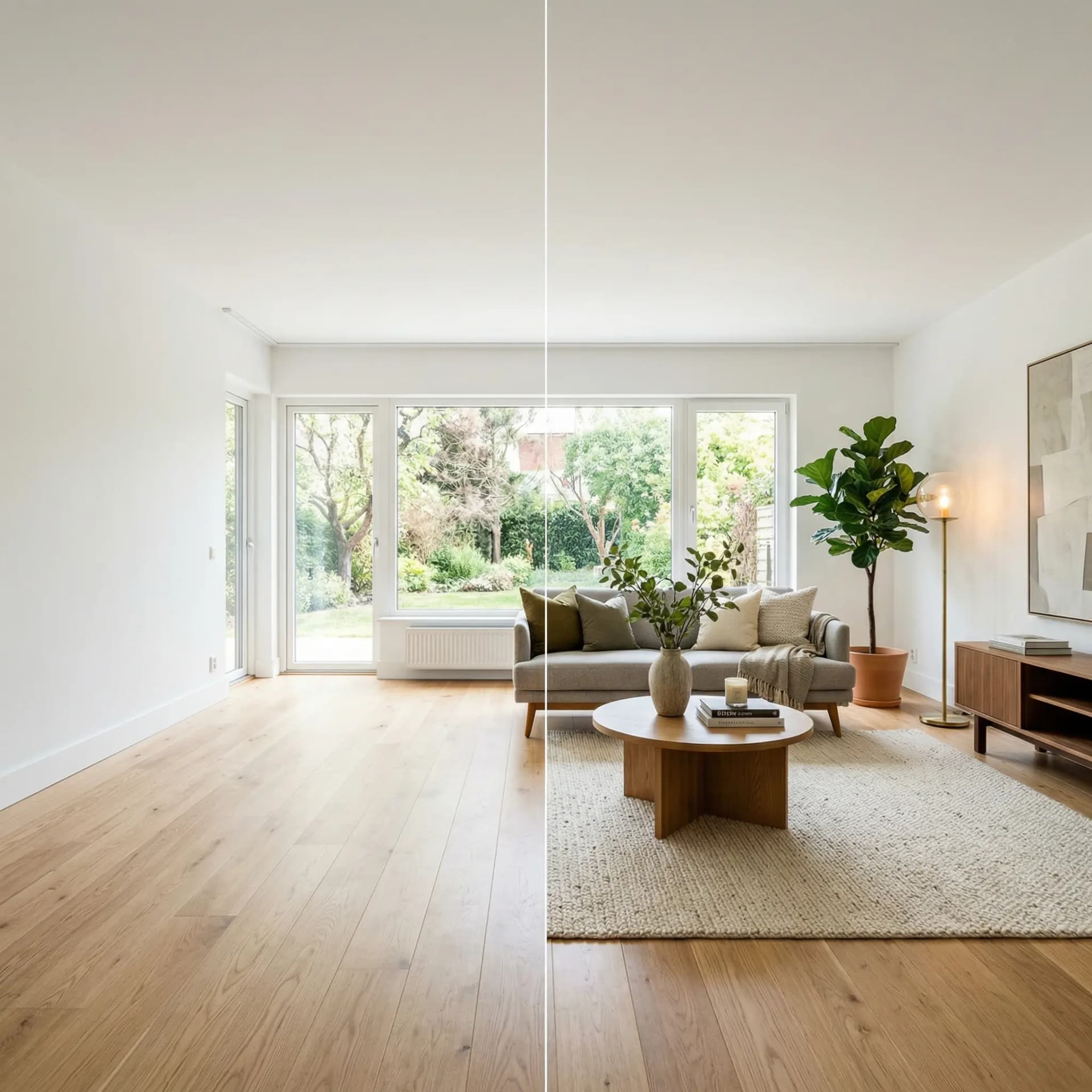
Get Your First Before and After in 60 Seconds
Upload a photo of an empty room to DrivewAI and see the before and after for yourself. Your first staged image is free every month — no credit card, no commitment. Paid credits let you pick from the full style set and get MLS-ready output in under a minute.
If you're managing multiple vacant listings, the Pro plan at $99.99/month covers unlimited staged images — enough to fully stage any number of properties per month.
For a complete guide to which rooms to stage and the ROI data, see our post on virtual staging for real estate. For cost comparisons across every staging method, check out how much virtual staging costs.
About the author
Noah James
Founder, DrivewAI
Noah James is the founder of DrivewAI, an AI home visualization platform that helps homeowners, contractors, and real estate agents preview renovations before committing. He built DrivewAI to close the gap between inspiration and execution in home improvement.
His writing focuses on practical renovation decision-making, material comparisons, and how AI visualization tools are changing the way people plan projects — from driveway replacements to full interior staging.
See your rooms staged by AI
Upload a photo and get AI renderings across all styles. First one free.
Try DrivewAI Free