Virtual Staging for Real Estate: How AI Turns Empty Rooms Into Sold Listings
By Noah James
• 8 min read • Founder, DrivewAI
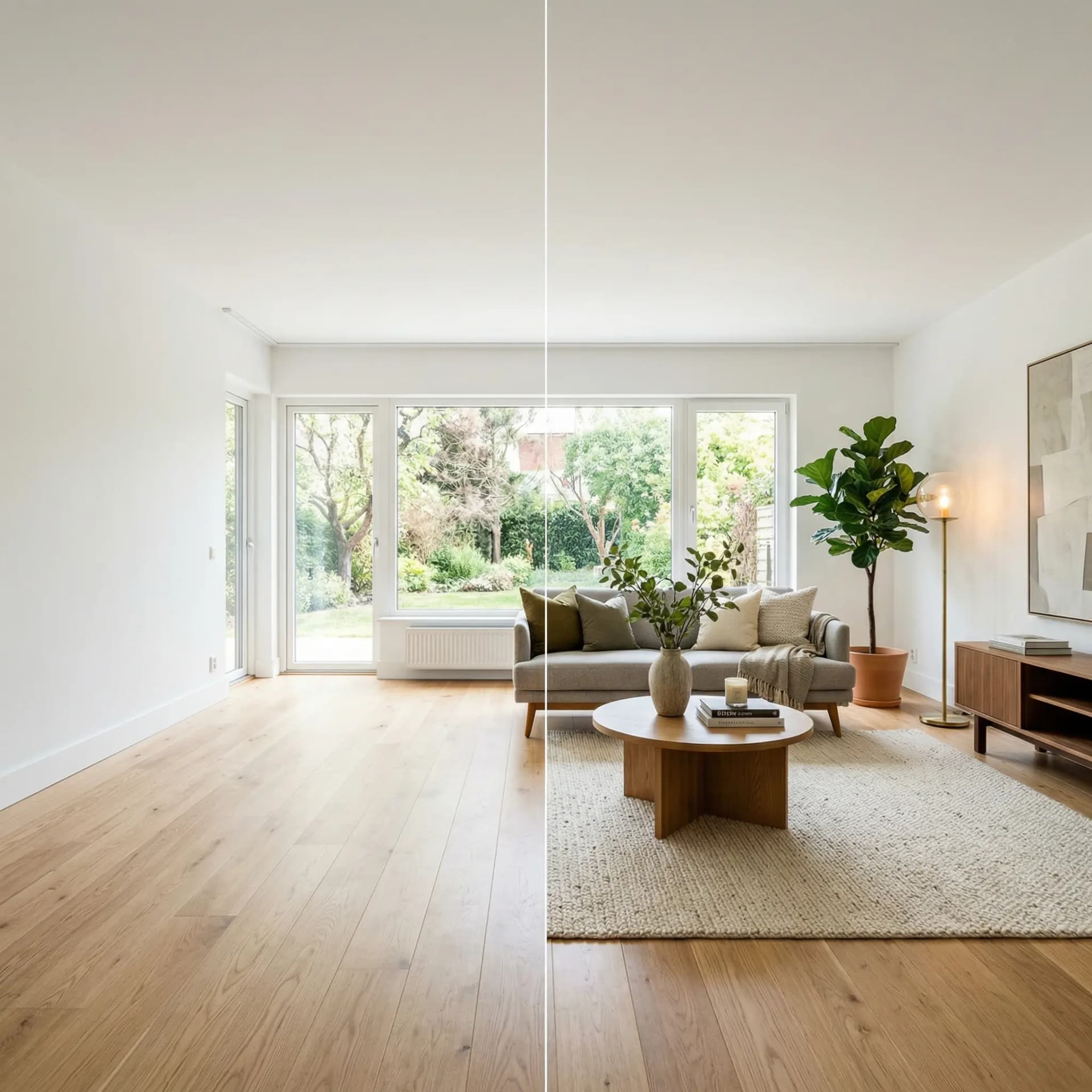
Virtual staging costs $0.25–$25 per photo depending on whether you use AI or a human designer — and either option beats the $2,000–$5,000 price tag of traditional physical staging. For vacant listings sitting on the market, that price difference is the entire argument. But cost is only half the story. The real question is whether virtual staging actually moves homes faster, and the data says yes.
According to the National Association of Realtors, 90% of buyers start their search online. According to the Real Estate Staging Association, staged homes sell 73% faster than unstaged ones. When buyers scroll through MLS listings, furnished rooms stop the thumb. Empty rooms get skipped.
What Is Virtual Staging?
Virtual staging is the process of digitally adding furniture, decor, and styling to photos of empty rooms. Instead of renting physical furniture and hiring movers, you upload a photo and get back a photorealistic image of the same room fully furnished. The architectural bones — walls, floors, windows, built-ins — stay identical. Only movable items are added.
There are two approaches to virtual staging today. The first is human-designed staging, where a designer manually places 3D-rendered furniture into your photo using software like Photoshop or SketchUp. This takes 24–48 hours and costs $100–$300 per photo. The second is AI-powered staging, where you upload a photo and an AI model generates staged variations in under a minute. This costs $0–$15 depending on the tool and plan.
How AI Virtual Staging Works
AI staging tools use image generation models trained on millions of interior design photos. The process typically works in two steps. First, the AI analyzes your room photo and identifies the architectural features — walls, windows, flooring, built-in elements. Then it generates new furniture and decor that matches the room’s proportions, lighting, and perspective.
The best AI staging tools (including DrivewAI’s interior staging) take this a step further with a two-stage process. The AI first “empties” the room by removing existing furniture while preserving every architectural detail. Then it stages the empty room in your chosen design style — Warm Contemporary, Coastal, Scandinavian, Mid-Century Modern, Modern Farmhouse, or Transitional.
This two-stage approach produces cleaner results than single-pass tools because the AI isn’t trying to work around existing furniture. It starts from a clean architectural canvas every time.
What Virtual Staging Costs in 2026
The market has compressed dramatically. Here’s what you’ll actually pay:
- AI staging tools (self-service): $0–15 per month for a subscription that includes multiple photos. Per-image costs range from free to about $2. DrivewAI offers a free monthly staging render, $9.99 5-packs, and Pro at $99.99/month for unlimited renderings. - AI staging tools (per-photo): Standalone services like Virtual Staging AI and Collov charge $0.25–$5 per photo with no subscription. - Human-designed virtual staging: $25–$300 per photo depending on the company and turnaround time. RoOomy and BoxBrownie are well-known options at the higher end. - Traditional physical staging: $2,000–5,000 per month for furniture rental, delivery, and styling. This is still common for luxury listings but increasingly replaced by virtual options.
For most agents listing vacant properties in the $300K–$800K range, AI staging at $0–15/month is the clear play. The ROI is immediate — one faster sale pays for years of the subscription.
Which Rooms to Stage (and Which to Skip)
Not every room needs staging. Focus your budget on the rooms that drive buying decisions:
- Living room — Always stage. This is the hero shot of every listing. Buyers need to see themselves relaxing here. - Primary bedroom — Always stage. A bare mattress on the floor (or worse, an empty room) kills the emotional connection. - Kitchen — Stage lightly. Add a cutting board, a plant, a fruit bowl. Don’t overstyle — kitchens sell on countertops and cabinet quality, not throw pillows. Kitchen staging is still evolving for AI tools, so keep it minimal. - Dining room — Stage if it’s a separate room. If it’s part of an open-concept layout, let the living room staging carry it. - Bathrooms — Skip virtual staging. Clean towels and a candle in the actual photo work better than AI-generated decor in a small space. - Exterior — Skip virtual staging for the yard, but consider AI driveway rendering if curb appeal is weak. A fresh driveway in the listing photos can shift buyer perception before they even walk in.
6 Staging Styles That Work for Real Estate
The style you choose depends on the property’s price point, location, and target buyer. Here’s what we’ve seen perform best across thousands of staging generations:
Warm Contemporary — Plush textures, cream and taupe palette, rounded furniture. Appeals to the widest buyer demographic. Our most-selected style.
Coastal — White and soft blue palette, natural rattan, airy atmosphere. Ideal for beach-adjacent properties or any listing targeting a relaxed lifestyle vibe.
Scandinavian — Light wood, white and gray palette, cozy textiles. Works beautifully in smaller spaces because the light palette makes rooms feel larger.
Mid-Century Modern — Tapered legs, warm walnut tones, bold accent colors. Appeals to design-conscious buyers in urban and suburban markets.
Modern Farmhouse — Slipcovered sofas, reclaimed wood, black metal fixtures. Strong performer in suburban and rural markets.
Transitional — The blend of traditional and contemporary. Classic silhouettes with clean lines. The most universally appealing style across demographics.
Virtual Staging Disclosure Rules
Transparency matters. Most MLS systems require you to disclose that photos have been virtually staged. The standard practice is to add a note in the listing description: “Photos have been virtually staged to illustrate the home’s potential.” Some MLS systems also require a “Virtually Staged” watermark or badge on the images themselves.
Failure to disclose can result in MLS fines, broker complaints, or buyer trust issues after showing. Always disclose. The good news is that buyers have become comfortable with virtual staging — it’s expected now, not deceptive.
How to Get Started with AI Staging
The fastest way to test virtual staging is to upload a photo right now. DrivewAI’s staging tool lets you upload a room photo and receive a photorealistic staged preview in under a minute. Your free monthly render is included — no credit card required — and paid credits unlock manual picks across the full style set.
If you’re listing a vacant property, start with the living room and primary bedroom in Warm Contemporary or Transitional style. These two styles test well across the broadest buyer demographics and produce the most natural-looking results.
For agents managing multiple vacant listings, Pro at $99.99/month covers unlimited renderings across all DrivewAI products — enough to fully stage multiple properties per month across key rooms.
Virtual staging isn’t a gimmick anymore. It’s a standard tool in the listing toolkit, and the AI-powered version has made it accessible to every agent at every price point. The only question is whether you’re using it before your listing goes live — or after it’s been sitting for 30 days.
About the author
Noah James
Founder, DrivewAI
Noah James is the founder of DrivewAI, an AI home visualization platform that helps homeowners, contractors, and real estate agents preview renovations before committing. He built DrivewAI to close the gap between inspiration and execution in home improvement.
His writing focuses on practical renovation decision-making, material comparisons, and how AI visualization tools are changing the way people plan projects — from driveway replacements to full interior staging.
See your rooms staged by AI
Upload a photo and get AI renderings across all styles. First one free.
Try DrivewAI Free