Virtual Room Restyling: 7 Ways to Reimagine a Space Without Renovating
By Noah James
• 8 min read • Founder, DrivewAI
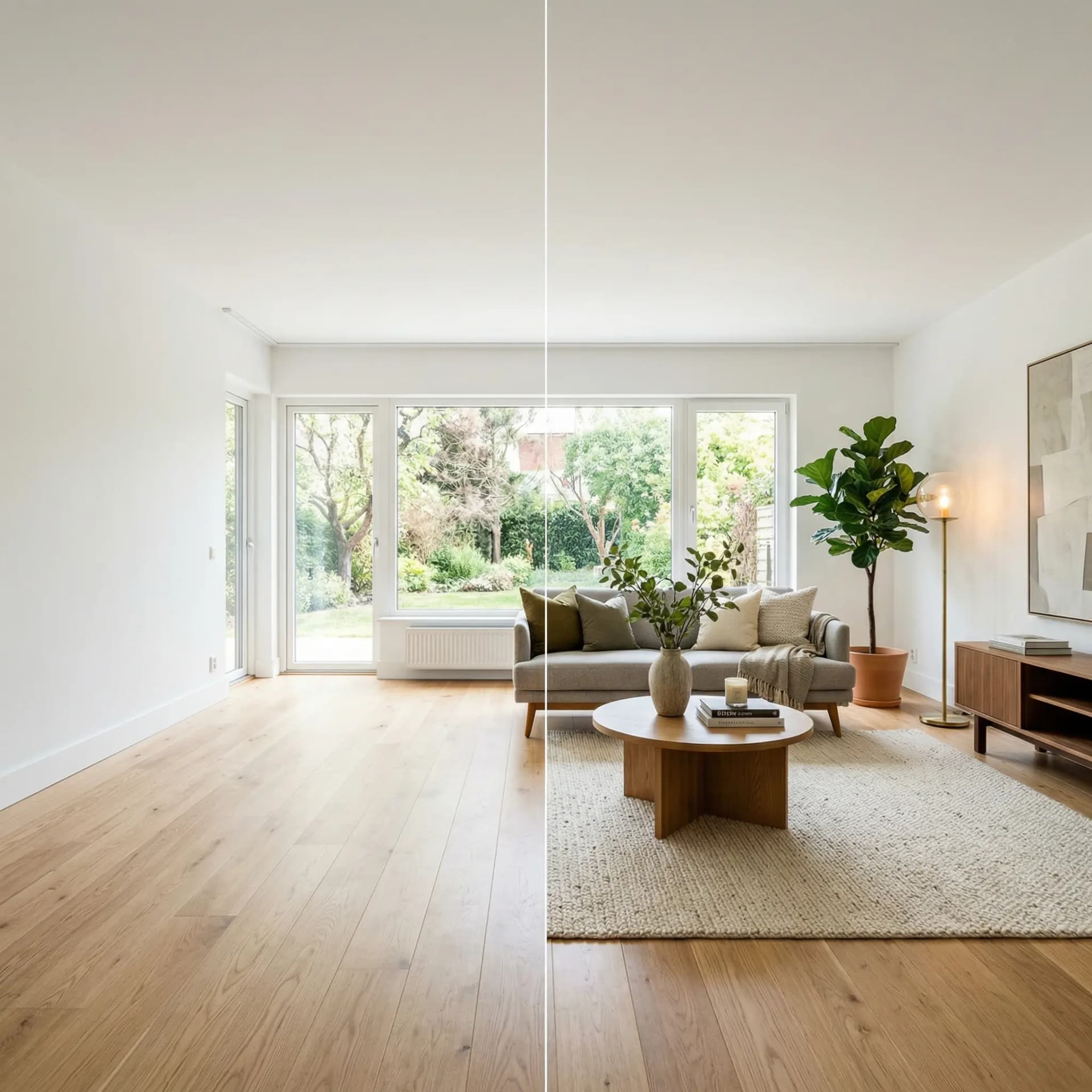
Most homeowners don't need a renovation. They need a refresh. The room you're tired of usually has good bones — the walls are in the right place, the windows are fine, the floors are holding up. What needs to change is everything that sits inside those walls: the furniture, the layout, the art, the paint, the lighting.
That's restyling, not renovation. And it's the most underused move in residential design because homeowners don't know what a restyle will actually look like until they've already committed to it. Virtual room restyling fixes that. You preview the new version of your room — furniture, decor, paint, the whole thing — before you spend a dollar.
Here are the 7 restyling moves that change how a room feels, and how to preview each of them with AI before committing.
1. Swap the Furniture Footprint
The single highest-impact change in any living space is swapping out the furniture. Not rearranging — replacing. New sofas, new dining table, new bed frame. It's expensive, but the effect is dramatic: a 2023 Houzz research report found that new furniture was the #1 driver of "love my room" sentiment in post-refresh surveys, beating paint, art, and lighting combined.
The problem is scale and style risk. Will the new sofa fit? Will the walnut dining table clash with your white oak floors? Will the bed frame overwhelm a small bedroom?
AI virtual restyling shows you the restyled room at correct scale in your exact space, so you know the answer before you order. Upload a photo, pick a style — say, Mid-Century Modern or Warm Contemporary — and the rendered result shows the new furniture placed where real furniture would go, photographed under your actual lighting.
2. Change the Paint Color
Wall color is the single cheapest high-impact change you can make. A gallon of paint is $40. The effect on a room's mood is larger than almost any other single change at the same budget.
But paint decisions go wrong constantly. Colors look different on swatches than on walls, different under different lighting, different next to your specific furniture. Sherwin-Williams and Benjamin Moore both publish color trend forecasts each year, but a trend color isn't the right color for your room — only you can decide that, and you need to see it first.
AI restyling tools now include wall-paint preview as a toggle. Turn it on, specify a color — "warm off-white," "sage green," "deep charcoal" — or let the AI pick a color that complements the style, and see your walls repainted. This isn't a mockup; it's a photorealistic rendering of your room in that paint color, with correct shadows and highlights.
3. Layer the Lighting
Single-source overhead lighting is the hallmark of an unstyled room. Layered lighting — a mix of table lamps, floor lamps, sconces, and ambient fixtures — is the hallmark of a room that feels "done."
The American Lighting Association recommends at least three layers of light per room: ambient (overhead), task (reading, work), and accent (highlighting art or architecture). Most homes have one layer.
Virtual restyling automatically adds layered lighting when you restyle a room. You'll see the rendered version with 2–4 light sources instead of 1, and it's often the element that makes you realize what was missing. Once you see the effect, buying a $120 floor lamp and a $60 table lamp is an easy decision.
4. Add Wall Art and Mirrors
Empty walls are the most common mistake in residential design. Architectural Digest has written extensively about the "wall art gap" — the observation that homeowners typically hang about 40% as much wall art as designers recommend for a balanced room.
Virtual restyling corrects for this automatically. When you restyle a room, the rendered result shows the walls properly decorated — framed art in clusters, statement mirrors, wall-mounted shelving, sconces. Comparing your current walls to the rendered version is often the prompt homeowners need to realize their walls are underdecorated.
The cost of wall art is modest relative to the impact. Framed prints from Etsy or Minted run $40–$150. A large mirror is $100–$400. Filling a living room wall to the density a designer would recommend typically costs $300–$700 — meaningful but not renovation-level spending.
5. Switch the Textiles
Throw pillows, area rugs, curtains, blankets — textiles are where homeowners cheap out most often, and where the payoff for upgrading is highest. Textiles are what make a room feel "soft" versus "sparse."
The rug is the biggest single textile decision. HGTV's design team consistently recommends sizing rugs up, not down — most living room rugs are two sizes too small. Virtual restyling shows you correctly-sized rugs in your actual room, which is the prompt most homeowners need to go up from a 5×8 to an 8×10 or 9×12.
6. Rotate the Layout
Sometimes you don't need new furniture. You need to use what you have differently. Turning a sofa perpendicular to a wall instead of flush against it. Floating a rug to define a conversation area. Moving a bed to the opposite wall.
Virtual restyling isn't limited to swapping furniture — when the AI restyles a room, it arranges the new furniture in layouts that often differ from the original. Studying the rendered layout can reveal opportunities in your existing setup. If the AI placed the sofa perpendicular to the window and you currently have it flush against the wall, that's a free experiment you can run this weekend.
7. Add Plants and Organic Texture
The last 10% of a styled room comes from organic elements — fresh flowers, potted plants, ceramic vases, wood bowls, woven baskets. These are the details that separate a "furnished" room from a "styled" one.
These elements are low-cost and high-impact: a fiddle-leaf fig is $60, a set of ceramic vases is $40, fresh tulips are $12/week. Virtual restyling will show you a fully-styled version of your room with all these elements in place, so you can shop toward the final look.
The Case for Restyling Over Renovating
The National Association of Home Builders reports that full-scale renovations average $48,000 for a single room in 2025. Restyling a room using the moves above typically costs $2,000–$8,000 depending on whether you swap furniture or keep it.
The ROI math favors restyling in almost every scenario short of major structural problems. A $5,000 restyle produces 70–80% of the "this feels like a new room" effect that a $48,000 renovation would, at 10% of the cost. Renovation makes sense when you need to fix something structural. Restyling makes sense when you want to fall back in love with a space that's architecturally fine.
How to Preview a Restyle in Under 5 Minutes
DrivewAI's virtual restyling tool handles all 7 moves in a single workflow:
1. Upload a photo of the room 2. Pick a style — Warm Contemporary, Scandinavian, Mid-Century, or 3 others 3. Toggle "Paint the walls" if you want to preview a paint change 4. Toggle "Remove built-in fixtures" if you want flexibility on fixed millwork 5. Generate the rendering
In 60 seconds you have a photorealistic preview of your room restyled — new furniture, repainted walls, layered lighting, decorated wall space, styled textiles, and organic details. Compare it to your current room and use it as a shopping list.
Your free monthly render is included. A $9.99 5-pack unlocks five customized renders for a specific room, and the Pro plan at $99.99/month covers unlimited renderings — enough to comprehensively preview every room in a multi-bedroom home.
Start With the Room You Use Most
If you're testing virtual restyling for the first time, start with your living room. It's the room you spend the most time in, the room guests see first, and the room where restyling produces the most emotional payoff. Second-best candidates: primary bedroom and dining area.
Upload a photo and try it — no credit card, no commitment. For deeper context on when virtual restyling is the right approach, see our guides on AI room redesign fundamentals and virtual staging before-and-after examples.
About the author
Noah James
Founder, DrivewAI
Noah James is the founder of DrivewAI, an AI home visualization platform that helps homeowners, contractors, and real estate agents preview renovations before committing. He built DrivewAI to close the gap between inspiration and execution in home improvement.
His writing focuses on practical renovation decision-making, material comparisons, and how AI visualization tools are changing the way people plan projects — from driveway replacements to full interior staging.
See your home transformed by AI
Upload a photo and get AI renderings across all styles. First one free.
Try DrivewAI Free