What Is Driveway Mockup Software? (And Why You Need It Before Calling a Contractor)
By Noah James
• 7 min read • Founder, DrivewAI
Here's something that drives me crazy about the home renovation industry: people will spend $15,000 on a new driveway based on a 4x4 inch color swatch and a contractor's verbal description. That's like buying a car based on the paint chip.
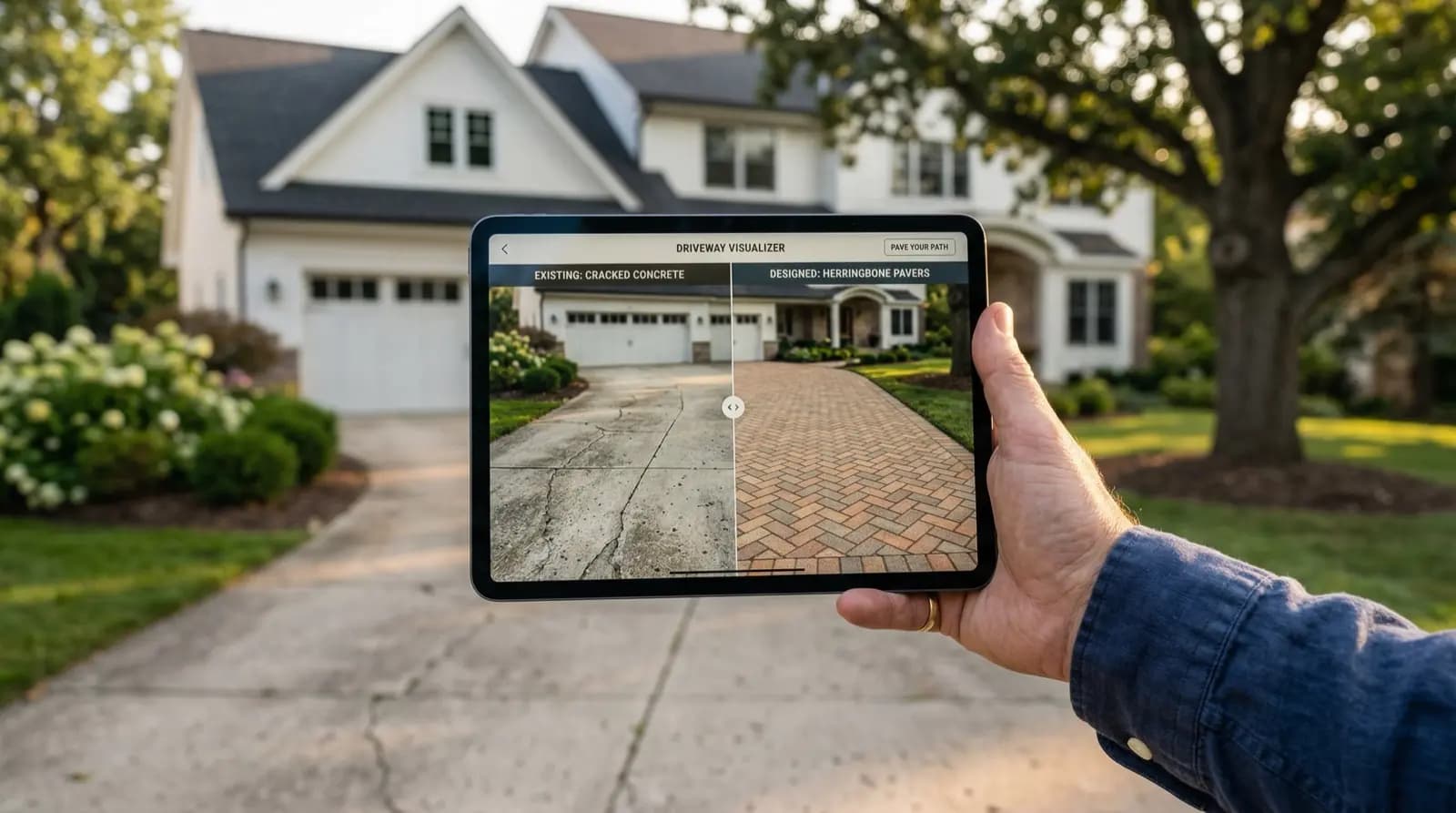
Driveway mockup software changes that equation entirely. You upload a photo of your existing driveway, and AI generates photorealistic renderings showing exactly what it would look like rebuilt in different materials. Your house. Your landscaping. Your property — just with a new driveway surface.
How Driveway Mockup Software Actually Works
The concept is straightforward, but the technology behind it is genuinely impressive. Modern driveway mockup software uses generative AI models trained on thousands of real driveway installations. The software identifies the driveway surface in your photo, maps its dimensions and perspective, and replaces it with a new material while preserving everything else in the frame — your home's exterior, the landscaping, shadows, even the cracks in your sidewalk.
The result is a rendering that looks like a real photograph, not a crude Photoshop overlay. Good mockup software preserves depth, lighting, and the natural imperfections that make a photo look real.
Most tools follow the same basic workflow: upload, select materials, download. The whole process takes about two minutes. That speed matters because it means you can compare seven different materials in the time it takes to make coffee — something that would have taken a professional designer several days (and several hundred dollars) not long ago.
Why It Matters More Than You'd Think
According to HomeAdvisor's 2025 data, the average driveway replacement costs between $4,500 and $15,000, depending on material and size. Natural stone driveways can push past $30,000 for larger properties. That's a massive financial commitment, and the material you choose is the single biggest variable in both cost and appearance.
Here's the problem: most homeowners have never seen stamped concrete, exposed aggregate, or interlocking pavers on their own home. They've seen them on Pinterest. They've seen them in a contractor's portfolio. But someone else's house with different architecture, different landscaping, different lighting — that's not the same thing.
Pavers that look stunning on a Mediterranean villa can look completely wrong on a colonial. The warm gray stamped concrete that works beautifully in Arizona can wash out and look dull in the Pacific Northwest's overcast light.
Driveway mockup software eliminates this guessing game. You see every option on YOUR property, with YOUR house, in realistic lighting conditions.
What Good Driveway Mockup Software Includes
Not all mockup tools are created equal. The ones worth using share a few features:
Multiple material options. You want a tool with a broad style library. Stamped concrete, interlocking pavers, natural stone, modern concrete, exposed aggregate, brick, and newer options like concrete-and-turf patterns all matter. If a tool only offers 2-3 options, it's not giving you enough to make a real comparison.
Photorealistic output. This is the big differentiator. Simple color overlays or pattern fills look fake and aren't useful for actual decision-making. The AI should handle shadows, perspective, material texture, and how the new surface interacts with your driveway's unique shape and grade.
High-resolution downloads. You need images you can zoom into and share with contractors. If the output is a blurry 500-pixel thumbnail, it defeats the purpose. Look for tools that generate at least 1080p resolution, ideally 16:9 format.
Contractor-shareable output. The whole point is to walk into a contractor meeting with a clear picture of what you want. The mockup should be clean enough that a contractor can reference it during quoting and construction.
The Real Cost Savings
Driveway mockup software doesn't just save time — it prevents expensive mistakes. A survey by the National Association of Home Builders found that roughly 23% of homeowners who completed exterior renovations wished they had chosen a different material. On a $12,000 driveway, that's a lot of regret.
Consider this scenario: you're leaning toward stamped concrete because a neighbor's looks great. You get quotes, pick a contractor, and two weeks into the project realize the pattern looks nothing like you expected on your property. At that point, you're either living with the result or paying demolition costs plus a full reinstall. We're talking $3,000-$5,000 in wasted money — easily.
A $15/month mockup tool could have shown you in two minutes that your home's architecture actually pairs better with interlocking pavers. The ROI isn't even close.
How DrivewAI Compares
DrivewAI is an AI home visualization platform. You upload a photo, and the AI generates a full-quality preview before you pay. $9.99 5-packs unlock the comparison set, edits, and sharing tools, while Pro at $99.99/month includes unlimited renderings for heavier use.
The entire process takes about 90 seconds from upload to finished mockups. No design experience needed, no app to download — it runs in your browser.
When to Use Mockup Software in Your Project
Timing matters. The best time to use driveway mockup software is before you contact contractors, not after. Here's why:
First, it narrows your material options. Going into a contractor meeting knowing you want interlocking pavers is dramatically more productive than saying "I'm not sure, what do you recommend?" Contractors respect homeowners who've done their homework.
Second, it gives you a visual reference for quoting. When three different contractors are looking at the same rendering, you get apples-to-apples quotes. Without that, each contractor imagines something slightly different, and the quotes are impossible to compare.
Third, it prevents scope creep. When you have a clear visual target, the project stays on track. No mid-project changes, no "actually, can we try this instead?" conversations that blow up timelines and budgets.
The Bottom Line
Driveway mockup software has turned what used to be a professional service — design visualization — into something any homeowner can do in their kitchen in two minutes. For a project that costs $5,000 to $30,000, spending a few minutes (and potentially $15) to see every option on your actual home before committing is a no-brainer.
The technology exists. The cost is negligible compared to the project. And the alternative — guessing and hoping for the best — is how people end up with driveways they don't love.
About the author
Noah James
Founder, DrivewAI
Noah James is the founder of DrivewAI, an AI home visualization platform that helps homeowners, contractors, and real estate agents preview renovations before committing. He built DrivewAI to close the gap between inspiration and execution in home improvement.
His writing focuses on practical renovation decision-making, material comparisons, and how AI visualization tools are changing the way people plan projects — from driveway replacements to full interior staging.
See your home transformed by AI
Upload a photo and get AI renderings across all styles. First one free.
Try DrivewAI Free